

How to create a galaxy from faction territories down to the smallest asteroid.
Avorion used to be a hobby project of mine. When I first started the development of this massive sandbox, I had already given up on several other games I made, because, in the end, the big issue was always the scope of the project. I had to build levels, create 3D models, textures, design enemies, and so on. I know that I have a general gist on aesthetics, on what looks good.
I also know what I want, but I had to realize over time that I’m simply not an artist. I have neither the skill nor the time to put onto paper what I had imagined in my head. So to not have this problem happen again with my next project, I chose to use a technique that many people were starting to use: Procedural generation. Creating an infinite number of worlds based on a generator. Or as I like to put it: The way that a programmer designs art, by writing an algorithm. In Avorion, the entire game world (galaxy) is procedurally generated, with some exceptions. When doing procedural generation, it’s essential to know what can be randomized and what can’t. It’s essential to tune the boundaries of a generation algorithm because otherwise, the results will be too random, unusable, and repetitive.
In Avorion, the generation consists of multiple layers of generators. There’s the galaxy, and inside this galaxy, there are factions and sectors. The factions have different traits and styles of building their ships. Depending on where in the galaxy they are, the properties of their ships are different. Some are stronger, and some are weaker. We chose a top-down approach to create the galaxy, with each system creating new seeds for their subsystems.
It’s important to note that you shouldn’t re-use the same seed for different subsystems; otherwise, you’ll get statistical dependencies. Number sequences spat out by two random number generators (RNG) initialized with the same seed will always be the same. If you use one RNG to determine whether a sector should have planets, and another, same-seed RNG to determine which colour its background should have, then you have a statistical dependency between planets and sector colour. For example, you might get a situation where only red sectors contain planets. (Not that this ever happened to us. Ahem.)
Generating the Galaxy
For the galaxy, the two most important layers are the faction territory layer and the sectors layer.
Sectors are the places where the game happens. The galaxy is subdivided in a 1000×1000 sector grid, where players can visit each sector. Inside those sectors are the stations, ships, and asteroids that players interact with and use. In this 1000×1000 grid of sectors, each grid cell has a 10% chance of containing content. We wanted space to still feel like space, which is why we’re leaving 90% of the sectors on the map empty. That leaves us with 100,000 sectors per galaxy to populate. Each grid cell’s coordinates hashed together with the overall server seed, then determines the sector’s final generation seed. Sectors are also split up in regular and “off-grid” contents, but more on that later.
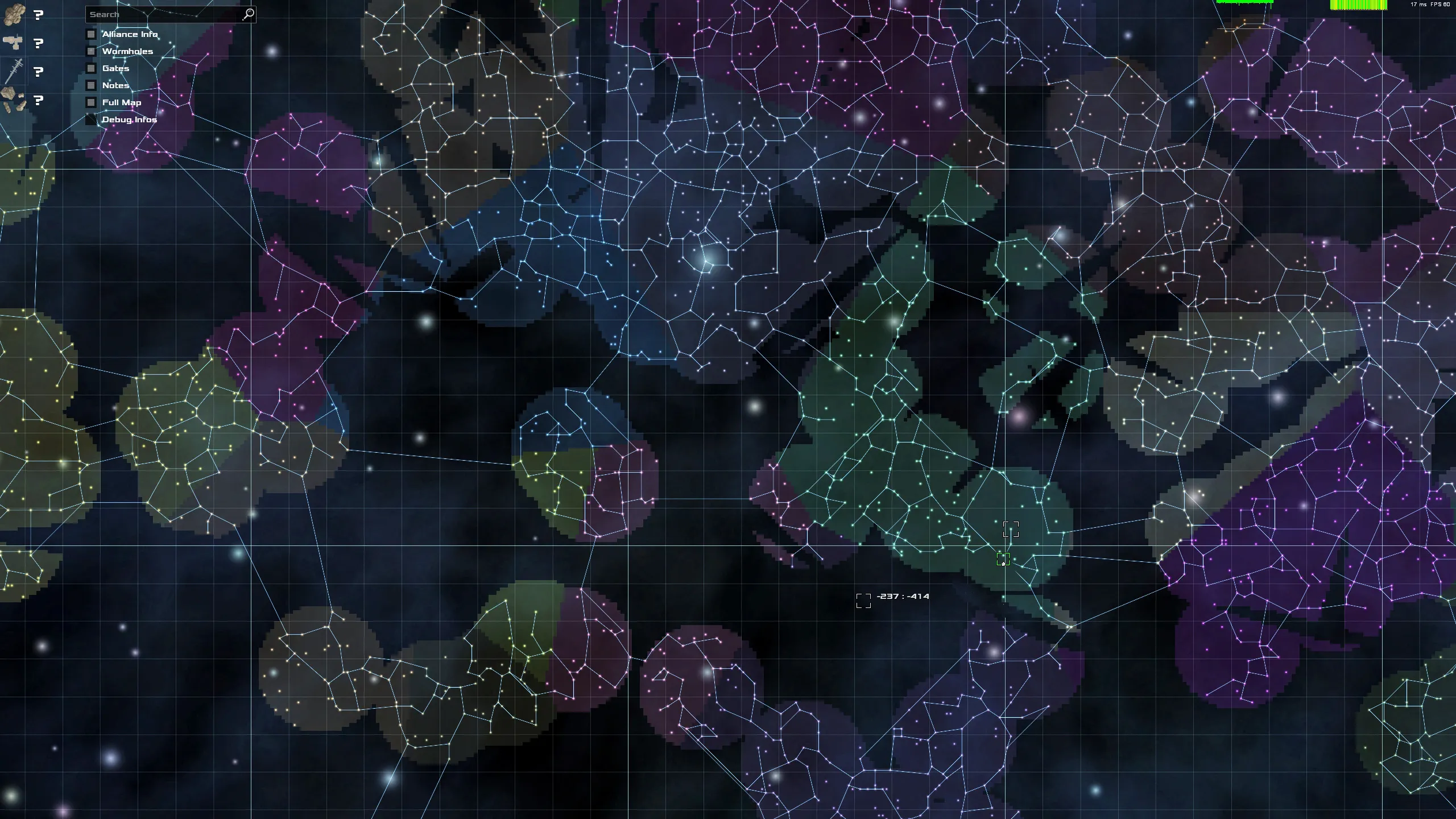
NPC faction territories are generated on a separate layer, the factions map. To generate faction territories, several hundred so-called “home sectors”, that define the centre of their territory, are placed in random sectors in the galaxy. Each faction has its home sector and influence radius. Their distribution is not the same everywhere, but we place fewer home sectors in the outer regions to simulate a less dense settlement. The same happens in the centre of the galaxy.
To find out which faction a sector belongs to, we can simply check which home sector is closest to the sector we’re looking at. One problem that we encountered with this approach was that now the factions map looks like a Voronoi Diagram, and doesn’t look very organic. To solve this problem, we’re generating another layer, in which we placed smaller “civilization spheres” with a radius of about 30 sectors. Only when a sector is inside of one of these spheres, it is considered “civilized” and thus belongs to a specific faction.
Everything in Avorion, including backgrounds, planets, stations, ships and asteroids is generated procedurally.
Uncivilized Territory
We wanted regions on the galaxy map that are not part of the regular factions system, where players can encounter pirates, start fights or find treasures, like asteroid fields rich with resources or secret smuggler’s stashes. These sectors are called “off-grid sectors”. We call those sectors off-grid sectors because players can’t see them by default like the regular sectors – they must install special upgrades to detect them.
This uncivilized territory was also implemented using the above mentioned “civilization spheres”. When a sector is inside of a civilization sphere, it actually only has a 60% chance to be a “regular” sector, and a 40% chance to be an off-grid sector. When it’s not inside of a “civilization sphere”, it’s always an uncivilized sector. The reasoning behind the 60 to 40 per cent ratio was that civilized territory could grow very large at times, and not having uncivilized sectors would mean players would be unable to find pirate encounters or other goodies.
Rifts
In Avorion’s story, subspace rifts have torn apart the galaxy. Lots of sectors have been swallowed by those strange appearances and have created barriers unsurmountable for regular hyperspace engines. We added those to add some barriers that players have to navigate around to make travelling to the centre of the galaxy a little more interesting.
These rifts are again created on a separate layer, similar to the above factions and sectors layer, where we can query for any sector if a rift blocks it or not.
Sector Content
To generate the content of a specific sector, we implemented several sector creation scripts. Those are .lua scripts that specify basic sector presets: Whether or not the sector has hyperspace gates, if it’s a regular or off-grid sector, and finally a function to generate the actual contents of the sector. The sector creation scripts also have a weight with which they’re created, to have some appear more often than others. Some examples for these presets are highly civilized sectors with lots of stations, traders and factories, entire factory fields, or asteroid fields with large mines.
When a sector at coordinates X Y is generated, all of the above layers are checked if there is actually content there. It’s checked if it’s a regular or off-grid sector, and finally, its creation script is chosen randomly with the scripts’ weights in mind. Then, the content of the sector is created based on the generate() function defined in the creation script, with a special generation seed created for the sector.
The generation of a sector is then rather straightforward. We have several API functions to create stations, entities and the like which we use for these purposes. At this point, we know the contents of the sector and the owning (and thus present) faction. Based on this information, block designs for the entities are generated, the entities are given scripts for their purposes (factory, shipyard, military ships, etc.) and then they are placed in random locations in the sector.
Visualization of the generation process: Designs for ships and stations are generated from multiple, predefined parts over several stages.
Station and Ship Plan Generation and Styles
Each ship, station, fighter, asteroid and the like has a block plan. That’s what we call the basic data structure which holds all the information about the blocks that the object consists of.
The plan generator is a separate generator that works based on so-called styles. We’re using the same basic generator for stations, ships, fighters and so on. We realized that the generation algorithm for ships and stations actually doesn’t differ a lot, but the parameters of how to generate the plan are different. Styles define those basic generation parameters, such as which parts to use, what colours, whether the used parts should be pointy and have spikes or be round, whether we want wings or not, and so on.
This also allows us to specify different styles for factions. Each faction has its own style for its stations and ships because we wanted factions to have their own recognizable visual features.
Pirate factions should be able to have mean-looking, dark ships with spikes on them, for example. The Xsotan (our evil alien race) should look rather random, but also not too random. It was very important to us that the ships generated from the same style resemble each other, much like cars from the same manufacturer.
By tweaking the styles, we could also easily have different ship classes. In order to get the generator to create another kind of ship, say a freighter instead of a military cruiser, all we have to do is tweak the style that we feed into the generator, instead of writing a separate generator.
So, to generate freighters or more industrial-looking ships, such as mining ships, all we have to do is adding container parts to the style’s list of used parts.
Once the generator has been initialized with a style, it selects parts from a predefined pool that will be used for creating the plan. The parts are based on various visual features, such as spiky, elegant, round, bulky, industrial looking, and so on, which have been defined in the style.
The generator itself is surprisingly simple and works in several linear stages defined in the style in which one or more parts are used. Similar to the other generators mentioned before it is initialized with seed before it starts to create a plan. It starts out with a basic bridge or cockpit part and then attaches core parts until the maximum available amount of volume for that stage has been reached. Next up, there is a stage in which engines are attached, and after that maybe some wings – provided they were defined in the style. Finally, some decorative elements are placed on the ships, such as antennas, armour plating or ventilation shafts. We implemented almost all of the above logic in Lua to guarantee a fast development process.
To add new parts, we would only have to add a new .lua file and press a button to see our new part in-game, without having to rebuild the project. The sections which we implemented in C++ are the ones that are critical to performance, such as actually stitching the parts together or finding a free position for the next part to attach (to avoid overlap).
Implementing the above specifications in Lua also means that the generator is open for modding. Modders can create their own parts, and define their own styles for military cruisers, freighters, mining ships and any kind of station.
Stations like this shipyard have special defining traits like construction scaffolds that make them easily identifiable.
Station Styles
We put a lot of thought into making different station types recognizable and how to breathe life into Avorion’s space stations. It was important to us that players don’t have to click each station to find out what kind of station it is. A shipyard should be recognizable as such, just like a factory or trading post should be. This was a task that was made a lot harder by already having faction-specific style visuals, like different colours and other features, because we couldn’t use those to identify different stations. We had to find another way that works hand in hand with the faction-specific visuals.
One way that we solved this problem was by adding specific parts that were reserved for specific stations, regardless of faction styles. For example, shipyards always have large scaffolds that suggest that ships are being built or restored there. Factories always get assembly lines. Farms and ranches get little greenhouses, and solar power plants always have large arrays of solar panels to generate energy.
But we couldn’t always add new parts for each station type. There were many cases in which this just didn’t make any sense. For example, a trading post doesn’t have visually characteristic facilities for commerce. So for other stations, instead, we tweaked their part ratios. One example would be the above mentioned solar power plants that always get lots and lots of solar panels.
Other stations like the biotope would always get lots of green biospheres, and trading posts and equipment docks always get tons of advertisement billboards. Equipment docks would also get a rather horizontal and wide shape, while trading posts would always have a very tall shape with lots of rings. Finally, for habitats, we tweaked their shape to get typical, tall apartment house structures that are familiar from big cities.
This is how we gave each kind of station a specific feature or shape that makes it stick out, which we can add independently from the already existing faction style features.
So that’s it, this is the general structure of the Avorion procedural generation algorithms. We start out at the top in the galaxy, where we place factions and populated sectors and then work our way down into subsystems. Each subsystem gets initialized with seeds from their parent system, so we can ensure a completely deterministic creation of our worlds.
Konstantin Kronfeldner – Founder and Creative Director
Konstantin Kronfeldner is the founder of Boxelware and the Creative Director of Avorion. Alongside his studies of Computer Science, he started building the game from the ground up. Now, as the company has grown, he has taken up many more responsibilities, but his passion remains with coding.